OAuth Clients
Use an OAuth client when an application must have delegated access for a Verdictan user. Verdictan supports authorization code flow with PKCE. The user reviews the requested scopes before Verdictan issues a code.
Use a scoped API token for unattended automation. Do not use a shared user session for automation.
Prerequisites
- Get an application owner and support contact.
- Select the smallest applicable OAuth scopes.
- Prepare a specified callback URI for each environment.
- Implement PKCE with the
S256challenge method. - Implement and verify the
statevalue.
Register a public client
Open API Tokens → OAuth Clients. Select Create client. Add the application name, redirect URIs, and allowed scopes.
The registration creates a public client ID. It does not create a client secret. Store the client ID with the application configuration.
The authorization request can use only registered scopes. Verdictan also verifies each scope against the active scope registry.
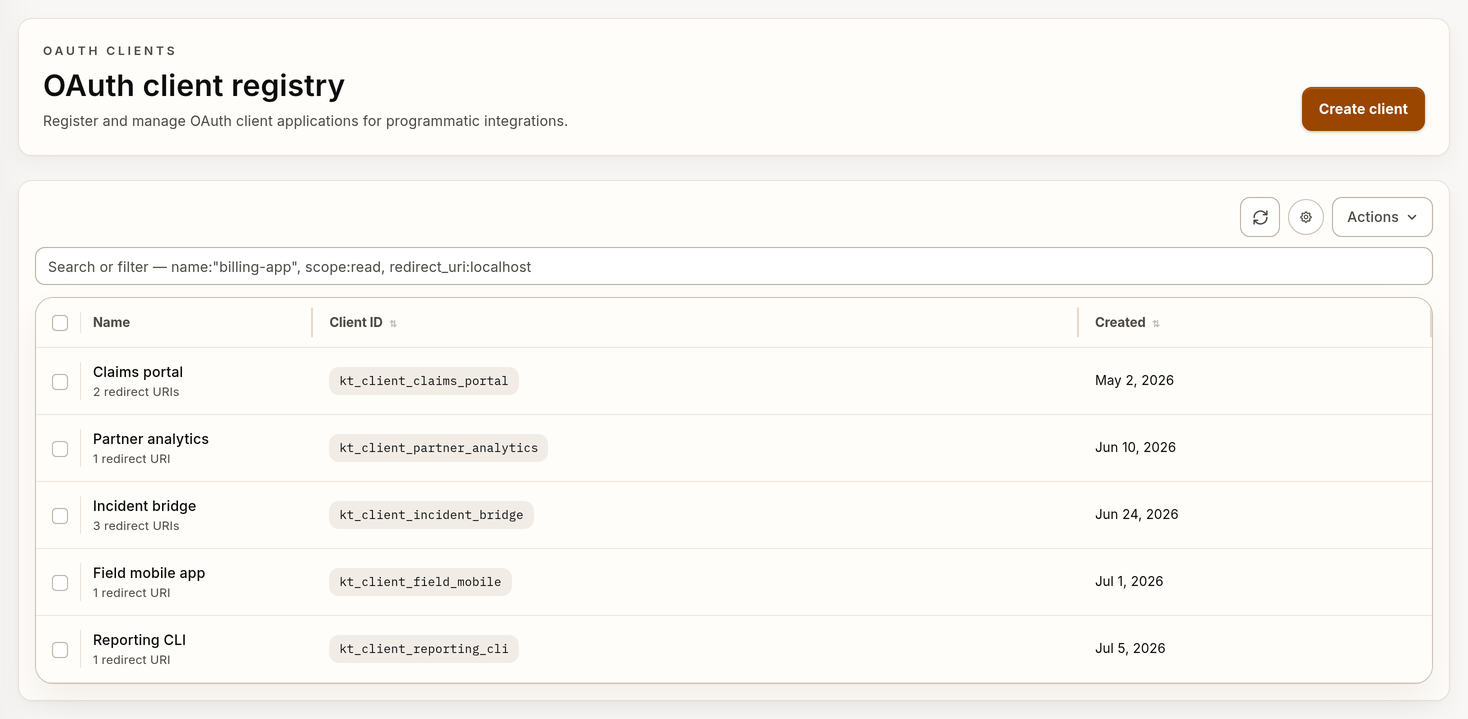
Example OAuth client registry with synthetic data.
Register specified redirect URIs
Use HTTPS for deployed callbacks. Local development can use HTTP only with a
specified loopback host. Supported loopback hosts include localhost,
127.0.0.1, and [::1].
The callback URI must be the same as a registered URI. Match the scheme, host, port, path, query, and trailing slash. Redirect URIs cannot contain user information or a fragment.
Use a different client when environments must have different owners or revocation workflows.
Start authorization in the browser
- Create a high-entropy code verifier.
- Create the base64url-encoded SHA-256 challenge.
- Create and store a unique
statevalue. - Open the console authorization route in the user's browser.
https://console.example.com/oauth/authorize?response_type=code&client_id=replace-with-client-id&redirect_uri=https%3A%2F%2Fapp.example.com%2Fcallback&scope=replace-with-registered-scope&state=replace-with-state&code_challenge=replace-with-s256-challenge&code_challenge_method=S256
Replace console.example.com with the console host for the active
environment. Do not send the browser to GET /v1/oauth/authorize. That API
route is retired.
The console must have an authenticated Verdictan user. It submits a protected preview request and shows the client, callback, and requested scopes. The user can approve or deny the request.
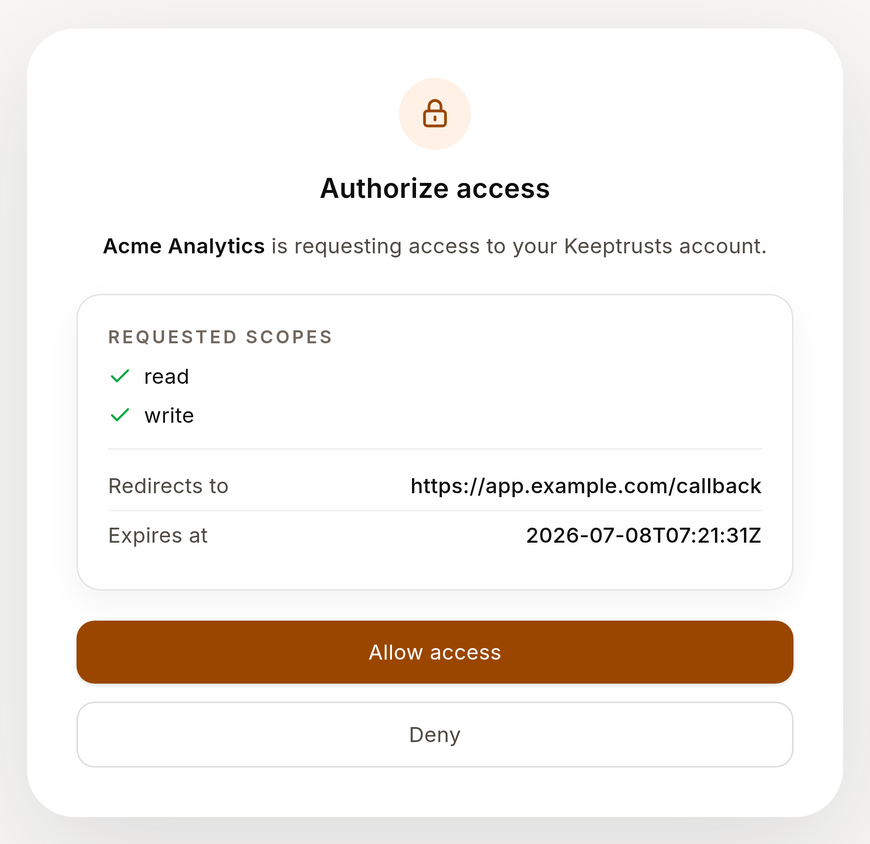
Example OAuth consent request with synthetic data.
After the decision, the console follows an API-built redirect. Approval adds a
one-time code and the original state. Denial adds error=access_denied.
Validate the callback
- Make sure that the callback
statevalue is the same as the stored value. - Stop the flow when the callback contains an OAuth error.
- Exchange an approved code one time.
- Do not put codes or verifier values in logs.
Exchange the code
Send the code to the API host. Use the same client ID, callback URI, and PKCE verifier from the authorization request.
curl --request POST "https://api.example.com/v1/oauth/token" \
  --header "Content-Type: application/json" \
  --data '{
    "grant_type": "authorization_code",
    "code": "replace-with-authorization-code",
    "redirect_uri": "https://app.example.com/callback",
    "client_id": "replace-with-client-id",
    "code_verifier": "replace-with-original-code-verifier"
  }'
When the exchange succeeds, the response contains a vdt_at_ access token,
expiry, approved
scope, and a refresh token. Send the access token as a bearer token only to
API routes permitted by its scope.
Store access and refresh tokens in server-side secret storage. Do not put them in browser storage, URLs, tickets, or logs.
Refresh or revoke a token
Use the refresh token grant to replace an expired access token:
curl --request POST "https://api.example.com/v1/oauth/token" \
  --header "Content-Type: application/json" \
  --data '{
    "grant_type": "refresh_token",
    "client_id": "replace-with-client-id",
    "refresh_token": "replace-with-refresh-token"
  }'
The response rotates the refresh token. Replace the stored value immediately.
Revoke an access token or refresh token when the application no longer uses it:
curl --request POST "https://api.example.com/v1/oauth/revoke" \
  --header "Content-Type: application/json" \
  --data '{
    "client_id": "replace-with-client-id",
    "token": "replace-with-token"
  }'
Client deactivation blocks new authorization requests and refresh grants. It does not revoke active access tokens that Verdictan issued before deactivation. Revoke those tokens separately.
Replace or deactivate a client
- Register a replacement with the necessary callbacks and scopes.
- Update each application environment.
- Complete the PKCE and consent flow in each environment.
- Revoke tokens from the previous client.
- Deactivate the previous client.
- Review Trail.
Frequent problems
| Failure | Check |
|---|---|
| Redirect mismatch | Same registered URI, including scheme, port, path, query, and trailing slash |
| Invalid client | Client ID, active state, organization, and environment |
| Invalid scope | Registered client scopes and the active scope registry |
| PKCE failure | Original verifier, S256 method, and base64url encoding without padding |
| Missing consent page | Console /oauth/authorize route, not retired API GET /v1/oauth/authorize |
| Callback state mismatch | Stored browser transaction and one-time state validation |
Token receives 403 | Approved scope and the permission necessary for the API route |