Roles and IAM Policies
An IAM policy defines statements. A role contains IAM policies. Users and teams can receive roles through organization or team assignments. API token role assignments have organization scope. They do not have a different team scope.
Verdictan evaluates access with deny-by-default behavior:
- A matching deny wins.
- A matching allow grants the action.
- No matching allow means deny.
Make a policy
Each statement has:
effect: allow or deny.- one or more action patterns.
- one or more resource VDT patterns.
- optional conditions for caller, resource, or request attributes.
Start with the Permissions Reference. Do not invent action strings from UI labels.
Use specified actions and narrow resources where possible. Use a wildcard resource only for an approved collection reviewer role. Do not use it as the default.
Create through the console
- Open IAM → Policies.
- Select New policy.
- Give the policy a job name and description.
- Add only the actions and resources that are necessary for the workflow.
- Add conditions only when the applicable attributes are always available.
- Save the policy.
- Examine the policy detail page.
- Open IAM → Roles.
- Select New role.
- Attach the policy to the role.
- Assign the role to a test team or member.
- Verify the specified allow results.
- Verify the specified deny results.
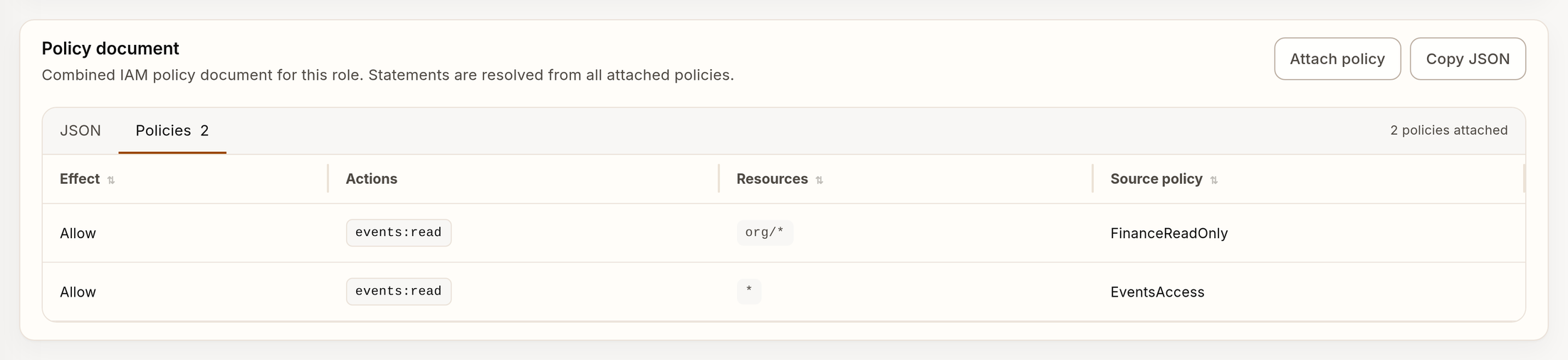
Example policy table for a role with synthetic data.
Do not confuse these IAM policies with the Access policy creation route. That route stores model-access constraints for request execution. The constraints can set model, gateway, provider, project, config, and agent scope. The route does not create an IAM policy. It does not attach a policy to a role. See Providers and BYOK Routing for the active provider-access limits.
Examine effective access
Review all three views:
| View | Question |
|---|---|
| Policy statements | What can this policy allow or deny? |
| Role effective actions | What does the complete role resolve to? |
| Role assignments | Which users, teams, or tokens receive the role? |
A person gets the attached policy only after a role assignment in the applicable scope. If you delete one assignment, a different team, direct grant, or role can continue to give access.
Test policy logic before you apply it
The CLI can simulate an IAM policy document. This command calls the
authenticated /v1/policies/simulate API route. First, complete verdictan auth login
or set VERDICTAN_API_TOKEN.
verdictan policy evaluate \
  --file iam-policies.yaml \
  --action events:read \
  --resource-vrn 'vdt:verdictan:events:eu:org_example:events' \
  --json
Optional caller, resource, and request attributes use JSON. Do these tests:
- Test the specified allowed action.
- Test a nearby action that the policy must continue to deny.
- Test a resource in the scope.
- Test a resource that is not in the scope.
- Test each necessary condition limit.
Simulation tests the supplied statements. It does not prove that production identity attributes, assignment scope, or authentication state match the test.
Deny and wildcard review
Review these high-impact items:
- Review
denystatements. - Review
*actions or resources. - Review broad region or organization wildcards.
- Review conditions that use optional attributes.
- Review roles that owners or automation tokens receive.
- Review changes to policies that many roles use.
A deny can override many allows. Before you add one, examine each role and principal to which the matching action and resource apply.
Remove access safely
- Examine role assignments.
- Find alternative direct and inherited grants.
- Simulate the specified post-change result.
- Detach the role or policy in a test scope.
- Verify the specified denial with a representative account.
- Apply to the production scope.
- Review Trail.
Use specified confirmation for destructive CLI commands:
verdictan role detach-policy \
  --role-id role_example \
  --policy-id policy_example \
  --yes
Frequent mistakes
| Mistake | Better method |
|---|---|
| You test with an owner. | Test with the actual role and scope. |
| You assign roles directly to all members. | Assign a job-function role to a team. |
| You use a broad wildcard after one failed request. | Examine the rejected action and resource VDT. |
| You delete a policy before you examine assignments. | Examine effective actions and assignments first. |
| You use an SSO group mapping as a policy. | Map groups to reviewed roles and teams. |