Agents in the Console
An agent is the durable identity for one customer workload. It connects ownership, runtime configuration, gateways, tags, Context Fabric, monitoring, and audit evidence.
When multiple gateway instances or deployments are part of one customer workload, use Agents.
What an agent owns
An agent record can contain:
- A stable name and description.
- Owner and team context.
- The selected configuration.
- Default-agent status.
- Management metadata.
- Linked gateways.
- Tags.
- Context Fabric state.
- Health, event, allow, block, and cache signals.
An agent is not a model-provider credential. It does not start a gateway.
A gateway process must have an agent binding and a runnable provider configuration.
Create an agent
- Open Agents.
- Select Create agent.
- Type a clear, durable identity. Use a workload name such as
support-assistant-prod. Do not use a host name. - Set ownership and team scope.
- Review the YAML document for identity, ownership, configuration, gateway IDs, and resource-tag fields.
- Save the agent.
- Open the detail view for the new agent.
The form writes the agent document to the API. Creating the record does not prove that a gateway is connected or that a provider request succeeds.
Link gateways
Open the agent's Gateways tab to link or unlink gateway records. The console limits selection to compatible same-region gateways.
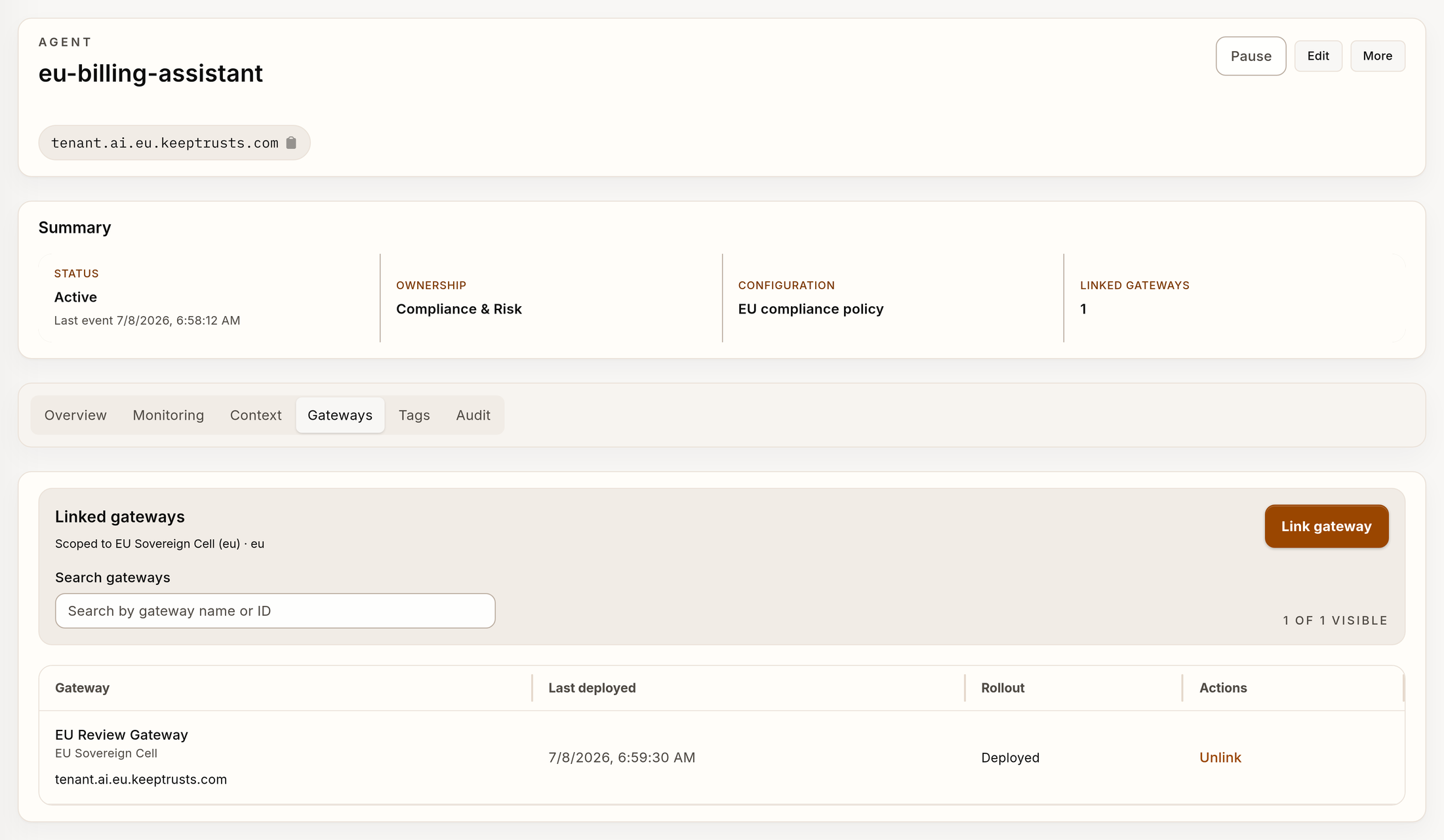
The agent, gateway, and region values in this image are synthetic.
Before you link a gateway, complete these tasks:
- Make sure that the gateway region and environment are correct.
- Make sure that the plan specifies replacement of an active binding.
- Identify the specified gateway configuration version.
- Preserve a rollback owner for production changes.
After you link a gateway, verify the binding on the agent detail page. Then, verify the binding on the gateway detail page.
Send a representative supported request through the gateway. A displayed link proves only control-plane state. It does not prove end-to-end traffic.
Use the detail tabs
| Tab | Use it for |
|---|---|
| Overview | Use this tab for identity, ownership, configuration, status, health, and lifecycle context. |
| Monitoring | Use this tab for request, outcome, and cache signals for the selected agent. |
| Context | Use this tab for the Context Fabric pool and statistics. |
| Gateways | Use this tab for same-region gateway bindings. |
| Tags | Use this tab for resource classification and policy-aware metadata. |
| Audit | Use this tab for agent-related Trail chronology. |
When you investigate a change, use a narrow time window. Correlate the agent configuration version, gateway, request ID, and Trail event.
Do not use one aggregate counter to make a conclusion.
Edit and delete safely
Use Edit to change the agent document. Review configuration, ownership, gateway references, and tags together because different teams can own these items.
The inventory supports bulk deletion. Bulk deletion does not delete protected default agents.
Before you delete an agent that is not the default agent:
- Remove or migrate live gateway bindings.
- Make sure that no token, automation, budget, tag workflow, or control manifest refers to it.
- Export necessary audit evidence.
- Make sure that the replacement identity is correct.
- Delete the agent.
- Verify the result in Trail.
Do not delete an agent merely to clear a transient health signal.
Prepare an agent for production
An agent is prepared for production only when all of these conditions are true:
- The ownership and team scope are correct.
- You selected the specified configuration and version.
- The gateway environment resolves the necessary secrets.
- The specified same-region gateway has the correct binding and reports its state.
- Context Fabric and tags agree with the workload data policy.
- A representative request passes through the gateway.
- You can find the resulting runtime evidence and audit evidence.
/healthz proves only gateway process health. It does not prove provider
routing, policy evaluation, evidence delivery, or correct agent binding.
CLI equivalent
For automation, use:
verdictan agent list
verdictan agent get --agent-id agent_example
verdictan agent link-gateway \
  --agent-id agent_example \
  --gateway-id gateway_example
Use Agents CLI for the complete command workflow.
Next steps
- Read Gateway Fleet.
- Read Configurations.
- Read Context Fabric Lifecycle.
- Read Resource Tags.
- Read Trail and Audit Evidence.