Gateway Fleet
Use Gateways to manage the control-plane inventory of connected gateway runtimes. The fleet view shows the registered runtimes and their last report times. It also shows the agent and configuration for each runtime.
It does not replace the local service manager. verdictan gateway status reports the status of a
locally installed process. The console shows the API view of a connected
gateway.
Register a connected gateway
- Open Gateways.
- Start gateway registration.
- Type a durable gateway name and the requested connection details.
- If you must bind the gateway during setup, select an active agent.
- Review the generated runtime command.
- Run that command only in the specified gateway environment.
- Return to the fleet.
- Wait for the first report.
The generated machine credential is a secret. Do not paste the command into tickets, shared chat, screenshots, or unapproved shell history.
Connected relay mode supports gateways that start an outbound control connection. These gateways can operate behind NAT.
This mode does not make each displayed hostname or endpoint available from each network.
Read fleet status
The fleet view can show these fields:
- Connection and health state.
- Endpoint and hostname metadata.
- Active agent and configuration context.
- Management mode.
- Last-seen time.
- Creation and update time.
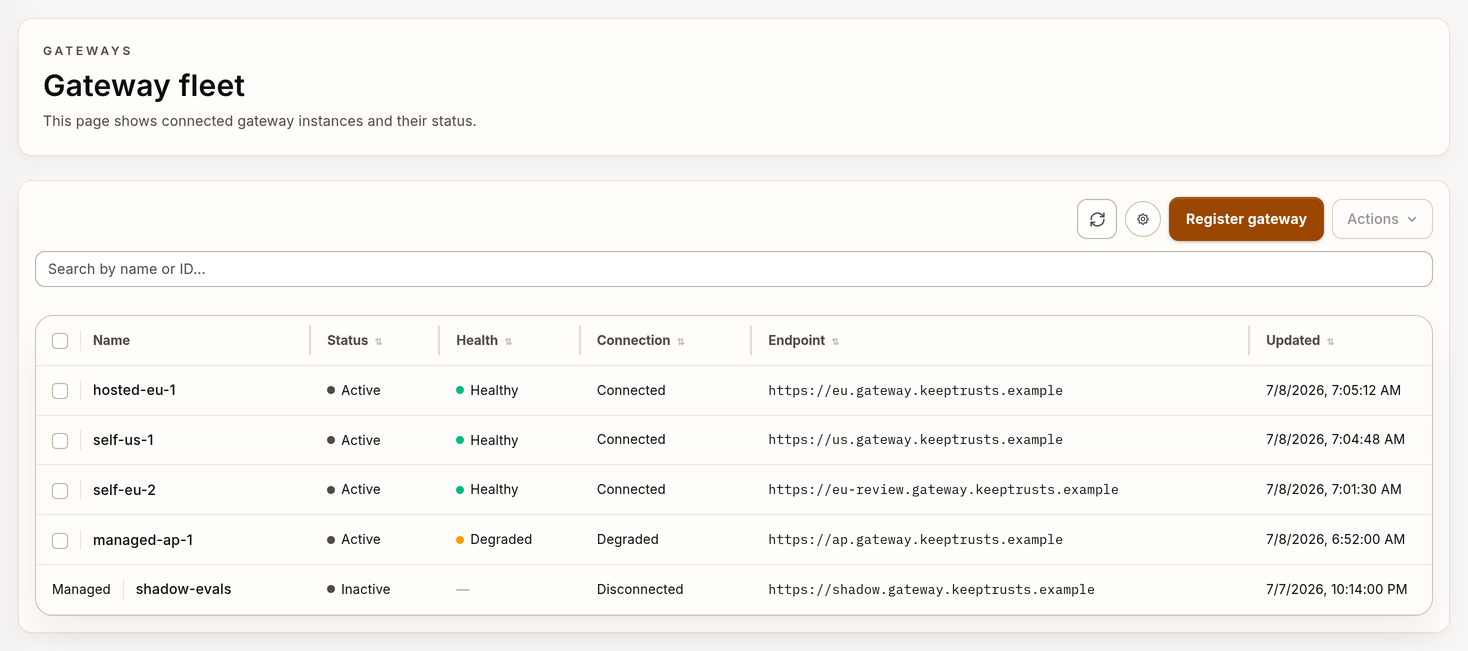
Example gateway fleet with synthetic data.
Interpret each field on its own:
| Signal | What it proves |
|---|---|
| Registered | The API has a gateway record. |
| Recently seen | The control plane received a recent report. |
| Healthy | The reported health check passed for that runtime. |
| Agent bound | The control plane records the agent relationship. |
| Configuration shown | The gateway reports that configuration context, or Verdictan assigns it. |
| Representative request succeeds | The application can connect to the gateway. Provider routing works. The selected policy path completes. |
No single inventory badge proves the last row.
Use the gateway detail view
| Tab | Use it for |
|---|---|
| Overview | Use this tab for identity, endpoint, agent binding, configuration, health, and the Context Fabric summary. |
| Runtime | Use this tab for runtime and provider telemetry. |
| Tags | Use this tab for resource classification and grouping. |
| Audit | Use this tab for gateway-related Trail records. |
Legacy action and performance URLs redirect into the related detail tabs. Bookmark the gateway detail page.
Select the applicable tab.
Provider metrics are runtime telemetry. A missing metric can mean no traffic, a late report, a disconnected gateway, or an access limit. A missing metric is not automatically a zero.
Verify a new or changed gateway
Use this sequence:
- Validate the specified config with
verdictan config validate. - Resolve providers and credentials with
verdictan gateway check. - When you use
--policy-config, start the runtime with--agent. - Make sure that the gateway is in the fleet and sends reports.
- Make sure that the agent binding and configuration version are correct.
- Use
/healthzto examine process health. - Send a representative supported request through the gateway.
- Find the request with
verdictan events tail --since 10m --jsonorGET /v1/events?since=10m. - If capture applies and retained session context is necessary, use History.
- Review the related Trail chronology for control-plane changes.
The direct request is essential. /healthz does not call a provider or execute
the full request policy path.
Rotate a machine token
The control-plane API supports
POST /v1/gateways/{id}/machine-token. The active gateway detail view does
not give an interactive control for this operation. Use an API workflow that the organization authorizes and reviews.
If unauthorized personnel can get a gateway credential, rotate it with this procedure:
- Identify the specified gateway and maintenance window.
- Call the machine-token rotation operation.
- Make sure that the transaction revokes all active runtime tokens for the gateway when it completes.
- When the operation returns the replacement token, copy it.
- After the operation, do not try to get the token from the gateway record.
- Update the secret source for the runtime.
- If the runtime does not connect again, start it or connect it again.
- Make sure that the fleet contains a new last-seen report.
- Send a representative request.
- Review Trail.
Do not share one machine credential across unrelated gateway records.
Remove a gateway
The fleet supports bulk deletion only for eligible, non-read-only records. Before you remove a gateway, complete these tasks:
- Drain or redirect application traffic.
- Unlink or replace the agent binding.
- Preserve configuration and evidence that are necessary for review.
- When the runtime is locally installed, remove service-manager state as a different task.
- Make sure that no control manifest declares the record.
After deletion, an independently managed process can continue to operate.
Next steps
- Read Connected Gateway Relay.
- Read Gateway Administration.
- Read Agents in the Console.
- Read Config Validation.
- Read Troubleshooting.