Providers and BYOK Routing
Verdictan routes traffic through connected gateways. Each upstream provider request uses a credential that your organization owns or controls.
This model is BYOK, which means "bring your own key".
Verdictan does not store, select, lease, inject, or pay for a platform-owned provider credential. There is no managed provider account and no shared platform key.
Catalog support is not provider access
The Verdictan model catalog shows which models the gateway can route and translate. A catalog entry gives routing support only.
A catalog entry does not give your organization access to the provider. You must supply a credential for each provider that you use.
Accepted BYOK sources
Use one of these credential sources for each provider target.
| Source | Where it lives | Config field |
|---|---|---|
| Organization provider key | Verdictan secrets store | secret_key_ref.store |
| Local environment key | Gateway host process environment | secret_key_ref.env |
| Operating-system keychain | Gateway host keychain | secret_key_ref.keychain |
| External secret store | A store that your organization controls | secret_key_ref.env after your store injects the value |
| Cloud workload identity | Your cloud account | Provider-specific block, such as Google Vertex ADC |
VERDICTAN_UPSTREAM_API_KEY is a BYOK source. The deploying organization
supplies its value on the gateway host.
The gateway rejects a request when it cannot resolve an authorized BYOK source. It does not try a platform credential.
Fastest path to first traffic
- Add a provider key to the organization secrets store.
- Tag the provider key, agent, and gateway or configuration.
- Attach a provider-access role through the authenticated API.
- Simulate policy access through the authenticated API.
- Send traffic through the connected gateway.
Connected gateways only
The provider-key, policy, and cost-control flows in this guide are for a connected organization. Verdictan resolves provider access from organization resources.
Use these resources as the source of truth:
- Provider keys in the organization secret store
- Resource tags on provider keys, agents, gateways, and configurations
- Policy bindings that grant an agent access to a tagged provider key
Add an organization provider key
The console BYOK onboarding panel in Secrets gives the reachable provider-key setup step:
- Select Configure to add a provider key, or Rotate for a configured key.
- Apply resource tags to align the provider key, agent, and gateway or
configuration. Use dimensions such as
environment,team, orowner.
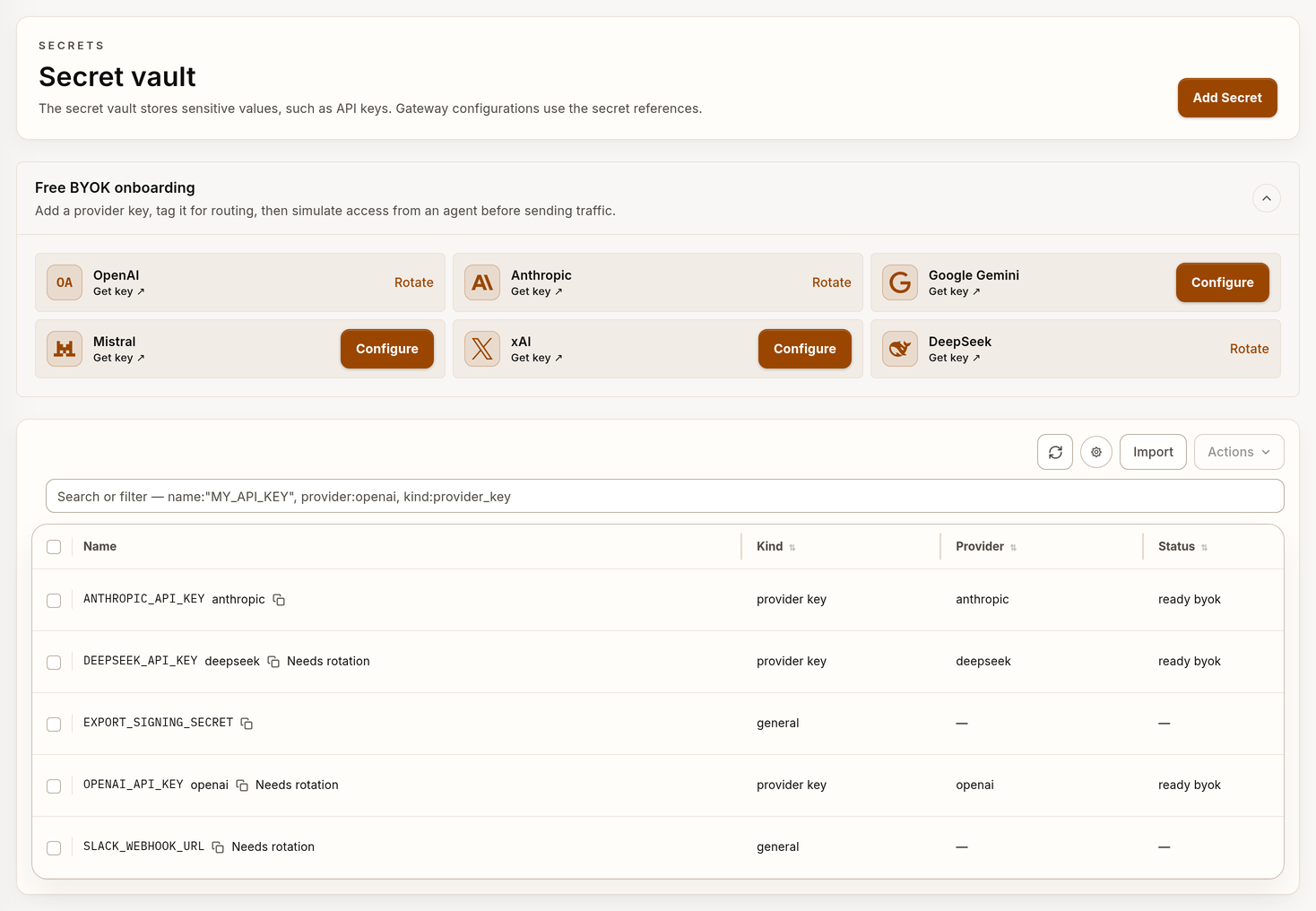
Example Secrets inventory with synthetic provider-key data.
The active console does not show its provider-key role-binding component or its Simulate access component on an agent page.
Complete those two steps with the authenticated API below. Do not look for an agent-detail panel that is not reachable.
Use a local key, a keychain, or an external store
A gateway host can hold the credential without the Verdictan secrets store. Select the source that matches your secret-management policy.
- Local environment key: Set
secret_key_ref.envto a Verdictan-prefixed variable name. An example isVERDICTAN_OPENAI_API_KEY. - Keychain entry: Set
secret_key_ref.keychainto the operating-system keychain entry on the gateway host. - External secret store: Let your store inject the value into the gateway
process environment. Then, reference that variable with
secret_key_ref.env.
Do not put a literal provider key in policy-config.yaml. Do not put a
credential-bearing Authorization header in a provider target.
Use a cloud workload identity
Some providers accept a workload identity that your cloud account controls. Google Vertex AI accepts Application Default Credentials on the gateway host.
A workload identity is a BYOK source because your organization controls it. The gateway does not add a platform identity when a workload identity is missing.
For the credential sequence of each provider, read the applicable integration page.
Grant agent access with policy
Adding a provider key does not grant access on its own. An agent receives provider-key access only through configured policy bindings.
New organizations start with the default Assistant agent. That agent is attached to a seeded Default Agent Runtime role.
The seeded role is only a binding target. It does not grant provider-key access until you attach policy statements to it.
Attach and simulate access through the API
The control-plane endpoints are live. Their console component is not mounted.
Use an API token with agents:write to attach a role. For a simulation, the
token must have agents:read and secrets:read.
export VERDICTAN_API_URL="https://api.verdictan.com"
export VERDICTAN_API_TOKEN="replace-with-api-token"
export VERDICTAN_AGENT_ID="replace-with-agent-uuid"
export VERDICTAN_ROLE_ID="replace-with-role-uuid"

curl -fsS -X POST \
  "${VERDICTAN_API_URL}/v1/agents/${VERDICTAN_AGENT_ID}/provider-key-access/bindings" \
  -H "Authorization: Bearer ${VERDICTAN_API_TOKEN}" \
  -H "Content-Type: application/json" \
  -d "{\"role_id\":\"${VERDICTAN_ROLE_ID}\"}"

curl -fsS -X POST \
  "${VERDICTAN_API_URL}/v1/agents/${VERDICTAN_AGENT_ID}/provider-key-access/simulations" \
  -H "Authorization: Bearer ${VERDICTAN_API_TOKEN}" \
  -H "Content-Type: application/json" \
  -d '{"provider":"openai"}'
The binding collection also supports GET. Detach a binding with
DELETE /v1/agents/{agent_id}/provider-key-access/bindings/{role_id}.
Validate BYOK readiness
The provider-key simulation API returns raw status values and policy details.
ready_byok is the only ready status. Other status values include inactive.
The response also contains allowed, decision, and status_reason. Use the
API response as the readiness decision.
Do not use a Configure or Rotate button as the readiness decision.
The gateway readiness route is POST /v1/gateway/access/preflight. It must have
an agent identifier. It returns ready_byok when an authorized key resolves.
Make sure that allowed is true before you route live traffic. If the
simulation reports no attached role or a denied decision, correct the binding
first.
Rotate a provider key
Rotate a credential when it reaches its age limit, or after a suspected exposure.
- Create the new credential in the provider account.
- Select Rotate on the provider key, or update the source that holds the value.
- Run the simulation again and verify that the status is
ready_byok. - Send one low-cost request through the gateway.
- Delete the previous credential in the provider account.
For a local environment key or a keychain entry, restart the gateway process after the value changes. The gateway reads the source at startup.
Revoke a provider key
Revoke a credential when a person leaves the team, or when the key is no longer in use.
- Revoke the organization provider key in Secrets. The gateway stops resolving it.
- Remove the policy binding when the agent must lose access to the provider.
- Delete the credential in the provider account. This step stops direct use external to Verdictan.
After revocation, the gateway returns a provider-readiness error for that target. It does not fall back to a different credential.
Tag the resources that must agree
Verdictan uses a shared resource_tags model across these resource types:
- provider keys
- agents
- configurations
- gateways
Tag all related routing resources with the same business dimensions:
environment=productionteam=paymentsowner=ml-platform
When tags agree and your policy grants access, the agent can read the matching provider key.
Tag rules
- You can add a maximum of 50 user tags for each resource.
- Tag keys must be unique on a resource.
- Tag keys are limited to 128 characters and values to 256 characters.
- Keys that start with
verdictan:are reserved for Verdictan-owned tags.
Manual tags and declarative tags
You can edit tags live only on manually managed resources.
If declarative config manages a gateway or configuration, Verdictan blocks live tag edits. Update the resource through its draft/apply flow.
This keeps runtime tags aligned with their owning configuration document.
Use this rule:
- Manual resource → edit tags in the console
- Declarative resource → update the draft config, then apply it
Provider readiness and cost governance
Provider keys control if traffic can route. Cost-governance budgets, token limits, and provider-headroom limits control if a request can continue.
Verdictan applies these limits before provider dispatch when pricing metadata applies. BYOK readiness does not bypass a configured cost control.
The gateway stops a request in these conditions:
- The request cannot resolve to a deployed agent rollout that is linked to the gateway.
- A configured budget or token limit blocks the estimated cost.
- The provider key is missing, revoked, or disabled.
- Policy denies agent access to the provider key.
Review Usage and Budgets to understand active limits and recent cost trends.
Seeded defaults are not recreated automatically
Some provider entries start as seeded defaults. They show the supported BYOK path immediately.
If you delete a seeded default provider key:
- Verdictan records that deletion
- the provider stays unavailable until you add or rotate a provider key
- Verdictan does not recreate the deleted seeded default automatically
To make the provider available again, open the provider setup flow. Create the key again manually.