Export evidence for a review
Use this workflow when a reviewer, incident manager, or auditor must have a date-bounded package of Verdictan decision-event evidence. The console workflow exports organization-scoped Events. It does not export immutable Trail records from the Trail event list.
For a filtered export of Trail change records, use
verdictan trail export.
Prerequisites
Before you start:
- Sign in to the selected Verdictan organization and region.
- Make sure that you can view export jobs with
exports:read. - Make sure that you can request exports with
exports:write. - Write down the review owner, purpose, and inclusive start and end dates.
- Record each request, escalation, incident, gateway, or agent ID that anchors the review.
- Make sure that the related application traffic created Events in Verdictan. History capture is not necessary for an Events export.
- Select the permitted storage location and recipients for the downloaded artifact.
Use the narrowest date window that answers the review question. Evidence files can contain sensitive metadata about operations although prompt content was redacted or not captured.
Workflow
1. Open the evidence export view
In the console, open Trail, then select Evidence exports. The direct
console path is /trail?view=exports.
The command palette also gives the same destination.
The export form has its own date and format controls. It does not inherit filters from the Trail event list, History, Inbox, or a different page.
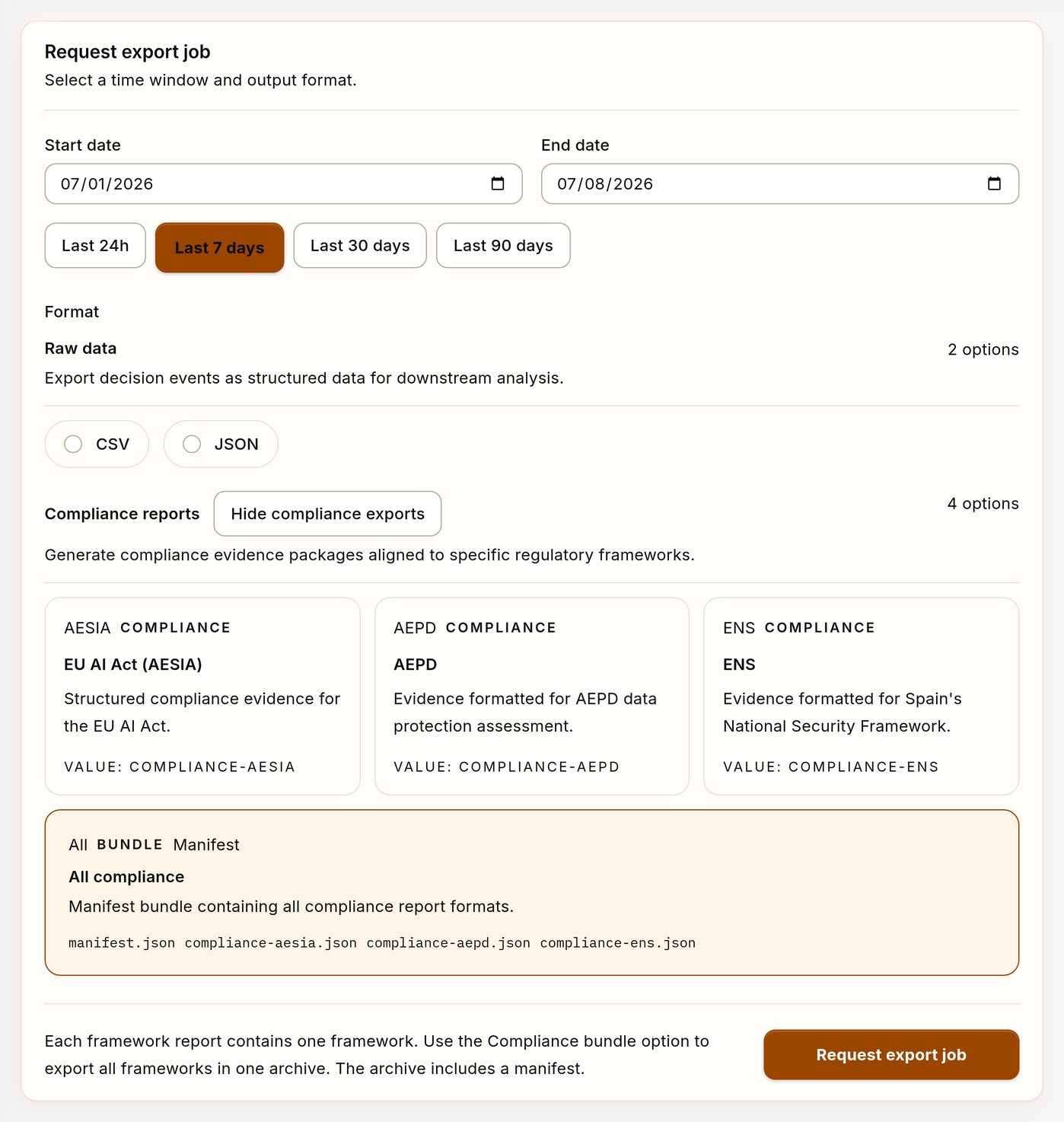
Example evidence export request with synthetic data.
2. Select the evidence window
Select a start date and an end date. The export includes the two dates.
Record the same dates in the review ticket or handoff note. If the reviewer gave a timestamp window, select its calendar dates.
Then, record the narrower timestamps in the handoff.
3. Select a format
Select the smallest artifact that the receiving workflow can use:
| Format | Artifact | Use it for |
|---|---|---|
| CSV | Comma-separated decision-event rows | Spreadsheet review and lightweight data exchange |
| JSON | Structured decision-event data | Programmatic review and downstream tooling |
| EU AI Act (AESIA) | JSON compliance evidence report | Review aligned to the AESIA report structure |
| AEPD | JSON compliance evidence report | Data-protection assessment aligned to the AEPD report structure |
| ENS | JSON compliance evidence report | Security evidence aligned to Spain's National Security Framework |
| All compliance | Gzip-compressed tar archive with a manifest and the organization's selected framework reports | A handoff with all compliance reports |
Compliance reports summarize exported Events against a report structure. They support a review.
They are not compliance certification. They do not replace legal, security, or auditor judgment.
4. Request and track the job
Select Request export job. The API accepts the request asynchronously:
| State | Meaning | Action |
|---|---|---|
queued | Verdictan accepted the request and has not started the export. | Wait. The console refreshes active jobs. |
processing | Verdictan is building and storing the artifact. | Wait. Do not request a duplicate. |
completed | The artifact is available when Download is enabled. | Download and validate it. |
failed | Processing stopped and the job record can include a failure message. | Preserve the job ID and message, correct the cause, then request a new job. |
expired | The artifact is no longer available. | Request a replacement with the recorded parameters. |
Download is available only when the job is completed and the artifact is
available. A job in queued or processing state is not evidence of completion.
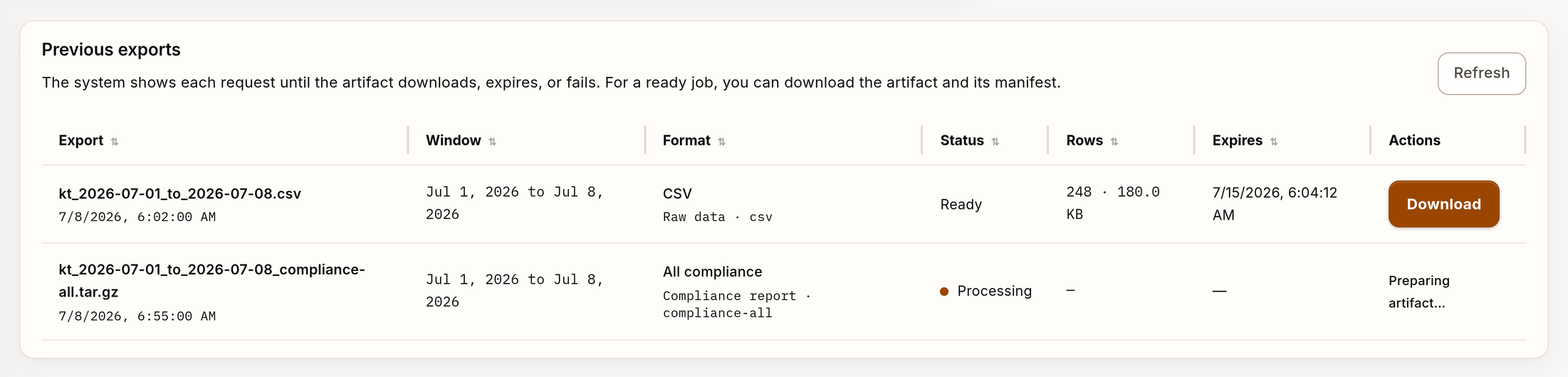
Example evidence export job history with synthetic data.
5. Validate the artifact
Before sharing the file, compare it with the job record:
- Job ID and last state.
- Inclusive start and end dates.
- Format and generated filename.
- Exported row count and file size, when shown.
- Specified request IDs, time coverage, environment, gateway, or agent context.
integrity.artifact_sha256, size, event count, recorded time, and append-only indicator when returned.- Manifest and artifact inventory from
GET /v1/exports/jobs/{job_id}/manifest. All-compliance bundles also includemanifest.jsonin the archive.
The generated filename includes the selected dates. The filename alone does not prove that the artifact contains the necessary evidence.
Open the file with approved tooling. Examine a representative sample.
Calculate SHA-256 with your organization's approved evidence tooling and
compare it byte-for-byte with integrity.artifact_sha256.
Preserve integrity.manifest_sha256 and the manifest response as proof of the
recorded inventory. A manifest hash does not replace the artifact hash.
Do not put credentials, one-time secrets, payment identifiers, or unrelated personal data in the review note.
6. Build the evidence packet
Pair the artifact with a concise note that includes:
- Review purpose and owner.
- Verdictan organization and region.
- Inclusive export dates and a narrower timestamp window, if applicable.
- Export job ID, format, filename, calculated artifact SHA-256, and the matching recorded integrity value.
- Request, event, escalation, incident, gateway, agent, or configuration IDs that help the reviewer correlate the evidence.
- The conclusion the evidence supports.
- Known gaps, redaction, disabled capture, unavailable fields, or other limitations.
- Storage location, access restriction, retention requirement, and next owner.
Include History content only when capture was enabled and it is necessary for the review. Inbox decisions and Trail change records are different evidence sources.
Reference them explicitly. Do not imply that the Events export contains them.
Troubleshooting
The export is empty
Do not widen the window immediately. First, make sure that these statements are correct:
- You are in the selected organization and region.
- The selected dates include the reported activity.
- The application used the correct Verdictan gateway and created Events.
- The related traffic was delivered to the control plane.
- The review is for decision Events rather than Trail change records, History content, or Inbox decisions.
Widen the dates only when the review scope allows it. Record the first and revised parameters.
The job failed
Preserve the job ID and displayed failure message. Correct the request, authorization, or service issue that the failure identifies. Then, create a new job.
You cannot download a failed job. Do not identify it as complete.
Download is unavailable
Refresh the job list and examine the state. Download is available only with
completed status and an available artifact.
If the job is expired, request a replacement. If it is completed but
unavailable, preserve the job ID.
Escalate the export-service issue. Do not create the same job many times.
The artifact is missing necessary evidence
Make sure that the IDs and date window agree with Events. Then, identify if the missing record belongs in Trail, History, or Inbox. A missing record in one export is not proof that the activity did not occur.
Completion checklist
- The organization, region, review owner, and purpose are recorded.
- The export uses the narrowest sufficient inclusive date window.
- The selected format matches the receiving workflow.
- The job is
completed, and the artifact was downloaded. - The artifact's content, dates, row count, and manifest were examined as applicable.
- The handoff includes correlation IDs, a digest, known limitations, and the next owner.
- Storage, access, retention, and deletion follow the approved evidence process.