Manage API Tokens
Verdictan uses one API token system. The ABAC context controls token behavior.
It contains purpose, principal_type, and runtime bindings. Bindings can set a
gateway, team, user, provider, model, or budget limit.
Select a token by its policy profile. Do not select it only by a key-product label.
The ABAC model
Each Verdictan API token is a vdt_... secret. The ABAC layer controls the
permitted actions for that token.
| Field | Example values | Purpose |
|---|---|---|
purpose | general, gateway_runtime, integration | Identifies the workload class for the token. |
principal_type | api_token, gateway_runtime | Identifies the principal shape for the policy engine. |
bindings | gateway_id, team_id, user_id, provider, model_filter, budget_id | Limits token access or operation scope. It also defines the default owner attribution. |
token_value | vdt_... | The one-time secret sent as Authorization: Bearer ... |
CLI flags use kebab-case for multiword purpose values. Thus, verdictan token create
and verdictan token list use gateway-runtime. API payloads and token metadata use
gateway_runtime.
Standard token profiles
| Workload | ABAC profile | Use it for |
|---|---|---|
App, SDK, IDE, or curl that calls the gateway | purpose=general, principal_type=api_token | Governed chat, responses, embeddings, and other traffic through the gateway. |
| Hosted gateway runtime identity from the CLI | purpose=gateway_runtime, principal_type=api_token, bindings.gateway_id=<gateway-id>, bindings.team_id=<team-id> | VERDICTAN_API_TOKEN on the gateway process. |
| Long-term machine integration | purpose=integration, principal_type=api_token, bindings.team_id=<team-id> | Service jobs that must have a machine identity and do not use the browser-safe gateway path. |
verdictan token create sends the purpose and bindings. It does not have a
principal_type flag. Thus, the API uses api_token by default. API callers can
create principal_type=gateway_runtime explicitly. This machine principal must
also have a team binding.
Older documentation can use Access Key for the first profile. It can use Gateway Key for the second profile. The two profiles are API tokens with different ABAC profiles.
Governed gateway keys
The API can also issue gateway tokens in governed key classes.
| Key class | Best fit | Necessary limits | What operators can examine subsequently |
|---|---|---|---|
durable | Long-lived gateway or client workloads | Optional expiry | Stable metadata, restrictions, and rotation/revoke controls |
virtual | Workloads that must have narrow provider, model, or gateway scope | Optional expiry | resource_id, resource_vrn, attached policies, and active restriction summaries. |
disposable | Short-lived execution windows and limited-use automation | Expiry plus budget or request depletion | Depletion counters, expiry, and automatic denial after exhaustion |
Each governed gateway key occurs in the unified /v1/tokens inventory. Create
and auth-code responses show token_value one time. Subsequent operations show only
metadata. This metadata includes key_class, resource_id, resource_vrn,
restrictions, and depletion state.
Disposable token lifecycle operations
Disposable governed keys are for short execution periods. Use them when a workload must stop at a time, spend, or request limit.
Disposable keys must have these controls:
- Set an expiry such as
expires_in_seconds. - Set a minimum of one depletion control, such as
max_budgetormax_requests. - Use narrow gateway, provider, model, team, or policy bindings where possible.
Disposable key lifecycle alerts open API Tokens at /tokens. Overview,
Inbox, and Usage/Budgets can link to the same token detail view. Use /tokens
for token actions.
| Lifecycle state | What it means | Safe next action |
|---|---|---|
| Budget near exhaustion | Spend is above a configured warning threshold. | Examine recent usage. Then, rotate, clone with narrower scope, or revoke the token. |
| Budget exhausted | The token has no remaining spend. | New gateway requests are blocked. Examine budget context before you create a replacement. |
| Request near exhaustion | Request count is above a configured warning threshold | Examine the caller and specified volume before extending the workload |
| Request exhausted | The token used all its permitted requests. | New gateway requests are blocked. Rotate or clone only when the workload must continue to have access. |
| Expiring | The token is in its expiry warning window | Rotate or clone with narrower scope before the deadline |
| Expired | The expiry passed | Create a replacement only if the workload must continue to have access |
| Rotation due | Rotation policy says the token is stale | Rotate and update the consuming workload |
| Emergency revoked | An operator revoked the token immediately and gave an explanation. | Examine the proof trail. Replace the token only after you understand the incident. |
The gateway blocks exhausted, expired, rotated, and revoked disposable keys before provider execution. Denial messages identify the token resource and cause. They do not show the raw token value.
Clone with narrower scope
Use clone-with-narrower-scope when a workload must continue to have access. Also use it when the token in use has too much scope or is near a limit.
The cloned token must have equal or narrower scope than the source token. The API rejects wider provider, model, gateway, policy, budget, request, rate, expiry, team, or metadata trust limits.
Examples of allowed narrowing:
- Decrease
model_filterfrom two models to one. - Decrease
max_budget. - Decrease
max_requests. - Set an earlier
expires_atvalue. - Bind to a narrower gateway or team if the source token lets you use that scope.
The clone response shows the new token value one time. The source token, alerts, work items, views, and proof events do not show the raw secret.
Emergency revoke
Use emergency revoke when an unauthorized person can access or misuse a disposable token. Also use it when the token is not safe.
Emergency revoke does these actions:
- It records the operator explanation.
- It revokes the token immediately.
- It makes the gateway validation and cache state invalid.
- It blocks future API validation, CLI validation, and gateway use.
- It creates proof in Trail without the token value.
After emergency revoke, make sure that the new scope is safe. Then, create a replacement.
Create API tokens
Through the Console
- Open API Tokens (
/tokens). - Select Create token.
- Type a name.
- Select the key class:
durable,virtual, ordisposable. - Set an expiry if it is necessary.
- Select a minimum of one role.
- Add necessary bindings for team or user attribution.
- Add necessary Agent, gateway, provider, model, credit, or request limits.
- For shared or service tokens, set a team owner.
- If
team_idanduser_idare configured, make sure that the user belongs to the team. - Copy the token immediately.
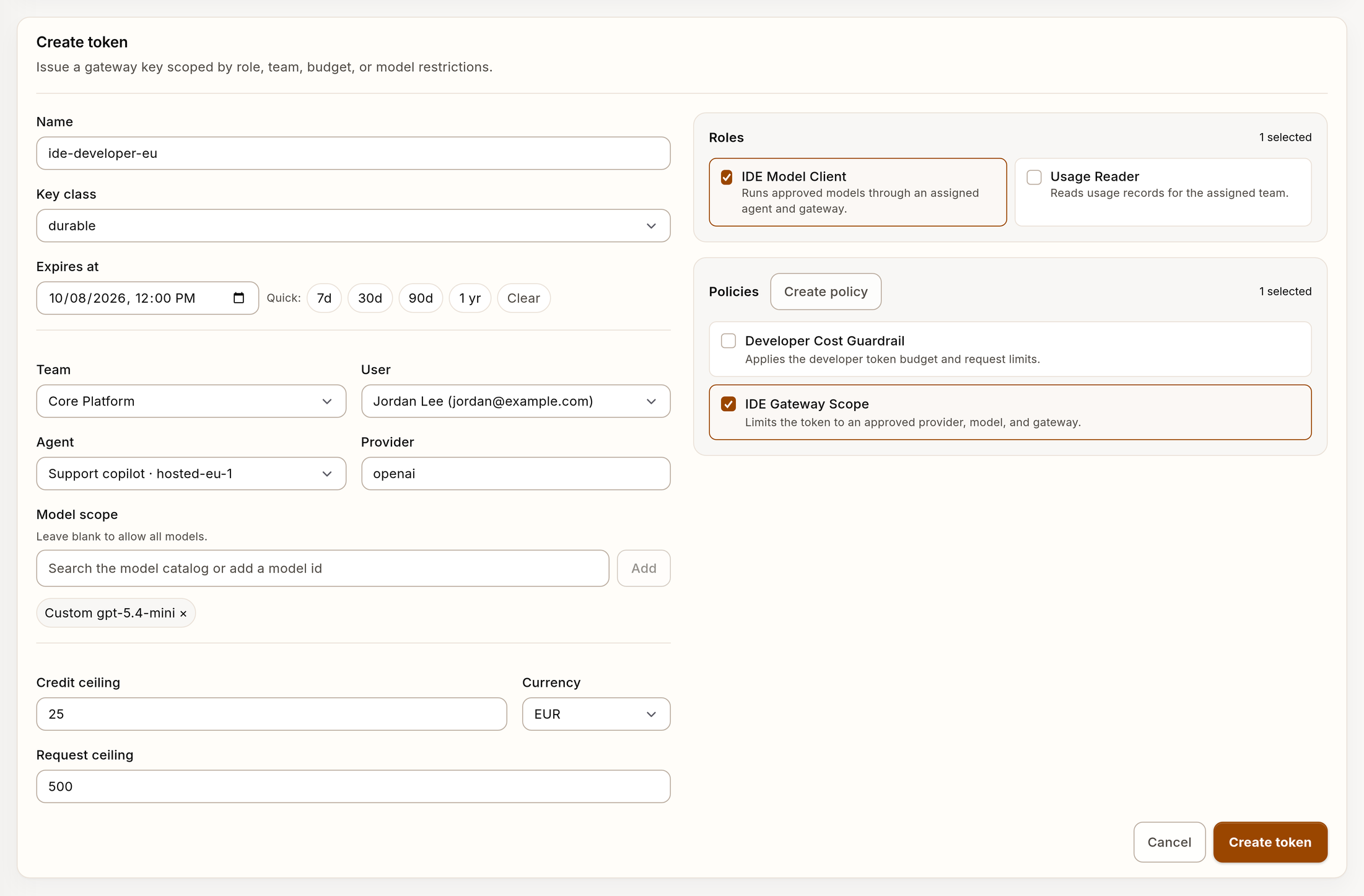
Example scoped API token creation form with synthetic data.
You must select a role before the console enables Create token. Access
policies are optional restrictions. The console shows the raw token_value
one time.
The console creates the general governed-token purpose. Use the CLI or API to
create gateway-runtime and integration purpose tokens.
Through the CLI
Create a gateway request token for apps and scripts:
verdictan token create \
  --name "support-web-prod" \
  --purpose general \
  --expires-in 90d
Create a hosted gateway runtime token:
verdictan token create \
  --name "hosted-gateway-eu-west-1" \
  --purpose gateway-runtime \
  --gateway-id 00000000-0000-4000-a000-000000000123 \
  --team-id 00000000-0000-4000-a000-000000000456 \
  --expires-in 30d
Create a scoped integration token:
verdictan token create \
  --name "billing-export-job" \
  --purpose integration \
  --team-id 00000000-0000-4000-a000-000000000456 \
  --expires-in 30d
Through the API
Create a gateway request token:
curl -X POST https://api.verdictan.com/v1/tokens \
  -H "Authorization: Bearer $ADMIN_TOKEN" \
  -H "Content-Type: application/json" \
  -d '{
    "name": "support-web-prod",
    "purpose": "general",
    "principal_type": "api_token",
    "bindings": {
      "team_id": "00000000-0000-4000-a000-000000000456",
      "user_id": "00000000-0000-4000-a000-000000000789",
      "model_filter": ["replace-with-configured-model"]
    },
    "expires_in_seconds": 7776000
  }'
Create a hosted gateway runtime token:
curl -X POST https://api.verdictan.com/v1/tokens \
  -H "Authorization: Bearer $ADMIN_TOKEN" \
  -H "Content-Type: application/json" \
  -d '{
    "name": "hosted-gateway-eu-west-1",
    "purpose": "gateway_runtime",
    "principal_type": "gateway_runtime",
    "bindings": {
      "gateway_id": "00000000-0000-4000-a000-000000000123",
      "team_id": "00000000-0000-4000-a000-000000000456"
    }
  }'
When a create operation succeeds, it returns a one-time secret:
{
  "id": "00000000-0000-4000-a000-000000000301",
  "name": "support-web-prod",
  "token_value": "vdt_...",
  "token_prefix": "vdt_abcd",
  "purpose": "general",
  "principal_type": "api_token"
}
Use a token correctly
Connect an application or script to the gateway
Use an API token with purpose=general:
curl https://gateway.example.com/v1/chat/completions \
  -H "Authorization: Bearer $VERDICTAN_GATEWAY_TOKEN" \
  -H "Content-Type: application/json" \
  -d '{
    "model": "replace-with-configured-model",
    "messages": [
      { "role": "user", "content": "Summarize the incident." }
    ]
  }'
Connect a gateway runtime to the control plane
Use a hosted-runtime API token with purpose=gateway_runtime as the gateway
process credential:
export VERDICTAN_API_URL="https://api.verdictan.com"
export VERDICTAN_API_TOKEN="vdt_..."
Do not reuse the gateway runtime token for browser applications, IDEs, or ordinary gateway client requests.
Use bindings to set scope
Bindings apply the ABAC model to operations.
| Binding | What it narrows |
|---|---|
gateway_id | Limits the token to a specified hosted gateway runtime |
team_id | Attributes or narrows the token to a specified team context |
user_id | Attributes the token to a user. This user becomes the default spend owner without specified gateway attribution. |
provider | Limits upstream provider access |
model_filter | Limits which models the token can route to |
budget_id / max_budget | Constrains spend at the token level |
If a token does not have a necessary binding or permission, the policy denies the request. The raw secret can have a correct structure.
The Usage explorer can show data for one token. This view uses token owner
fields for default spend attribution when the gateway forwards only key_id.
List and examine tokens
List all tokens:
verdictan token list
Filter by purpose:
verdictan token list --purpose gateway-runtime
Examine a specified token:
verdictan token get 00000000-0000-4000-a000-000000000301
API list filtering uses the same ABAC fields:
curl -H "Authorization: Bearer $ADMIN_TOKEN" \
  "https://api.verdictan.com/v1/tokens?purpose=general&status=active&limit=100"
The API returns at most 100 tokens on each page. When next_cursor is non-null,
send it unchanged as cursor on the next request and preserve the same
filters:
curl -H "Authorization: Bearer $ADMIN_TOKEN" \
  "https://api.verdictan.com/v1/tokens?purpose=general&status=active&limit=100&cursor=$NEXT_CURSOR"
List results include role and attached-policy metadata. They do not include the raw token value.
Rotation
Use this overlap sequence for production token replacement:
# 1. Create the replacement token
verdictan token create \
  --name "support-web-prod-next" \
  --purpose general \
  --expires-in 90d

# 2. Deploy it to the consuming workload

# 3. Send a probe with a unique X-Request-Id.
# Confirm that the delivered Event identifies the replacement token.

# 4. Revoke the old token
verdictan token delete 00000000-0000-4000-a000-000000000301 --yes
Token rotation does not change the ABAC profile. For a different purpose,
principal_type, or wider binding set, create a new token.
Revocation
Through the Console
- Open API Tokens (
/tokens). - Select the token name to open its detail page.
- Open More ▾.
- Select Revoke.
- Approve the operation.
For a bulk operation, select token checkboxes in the inventory. Then, use Revoke selected.
The API makes revoked tokens invalid immediately. A request that is in progress
can finish. The API rejects new requests with 401 Unauthorized.
Through the CLI
verdictan token delete 00000000-0000-4000-a000-000000000301 --yes
Security practices
| Practice | Why |
|---|---|
| Select the token by ABAC profile, not by label. | This prevents confusion between app traffic and runtime identity. |
Use purpose=general for app gateway requests. | This keeps browser and script traffic on the specified path. |
Reserve purpose=gateway_runtime for VERDICTAN_API_TOKEN on the gateway process. | This prevents clients from getting unintended privileges. |
| Add bindings before token use. | This decreases the possible effect of an exposed token. |
| Set an expiry on long-term tokens. | This limits damage from exposed credentials. |
| Use disposable keys for limited automation. | This gives short workloads automatic stop conditions. |
| Exhaustion and expiry are block signals. | This prevents provider execution after token depletion. |
| Match expiry and rotation to the organization credential policy. | This aligns token lifetime with the workload and risk. |
| Do not commit tokens to version control. | Use environment variables or secret managers. |
Monitor last_used_at and revoke stale tokens. | This removes forgotten credentials before they become a risk. |
Next steps
- Install the Gateway — Configure runtime tokens for a local or shared gateway.
- Debug AI Requests — Examine governed request results and live decision signals.