Trail and Audit Evidence
Trail is the immutable audit surface for actors, resources, changes, request context, and integrity metadata. Use it to reconstruct who changed what, when, and with which result.
Do not use Trail as a synonym for each observability surface:
| Surface | Primary evidence |
|---|---|
verdictan events or GET /v1/events with since set | Runtime governance outcomes and request-policy activity |
| History | Captured conversation and session content when enabled |
| Inbox | Human-review work items and decisions |
| Trail | Control-plane actions, resource changes, audit chronology, and record integrity |
Search the console
Open Trail and narrow the result with:
- date range.
- event category.
- actor type or actor ID.
- resource type.
- event name.
- verdict.
- read-only state.
Start from a request ID, event ID, resource ID, or short UTC window when available. Expand only when the investigation makes this action necessary.
The active console does not give access-key-prefix lookup as an active search filter. Use supported actor, request, resource, and event fields. A key filter was not applied.
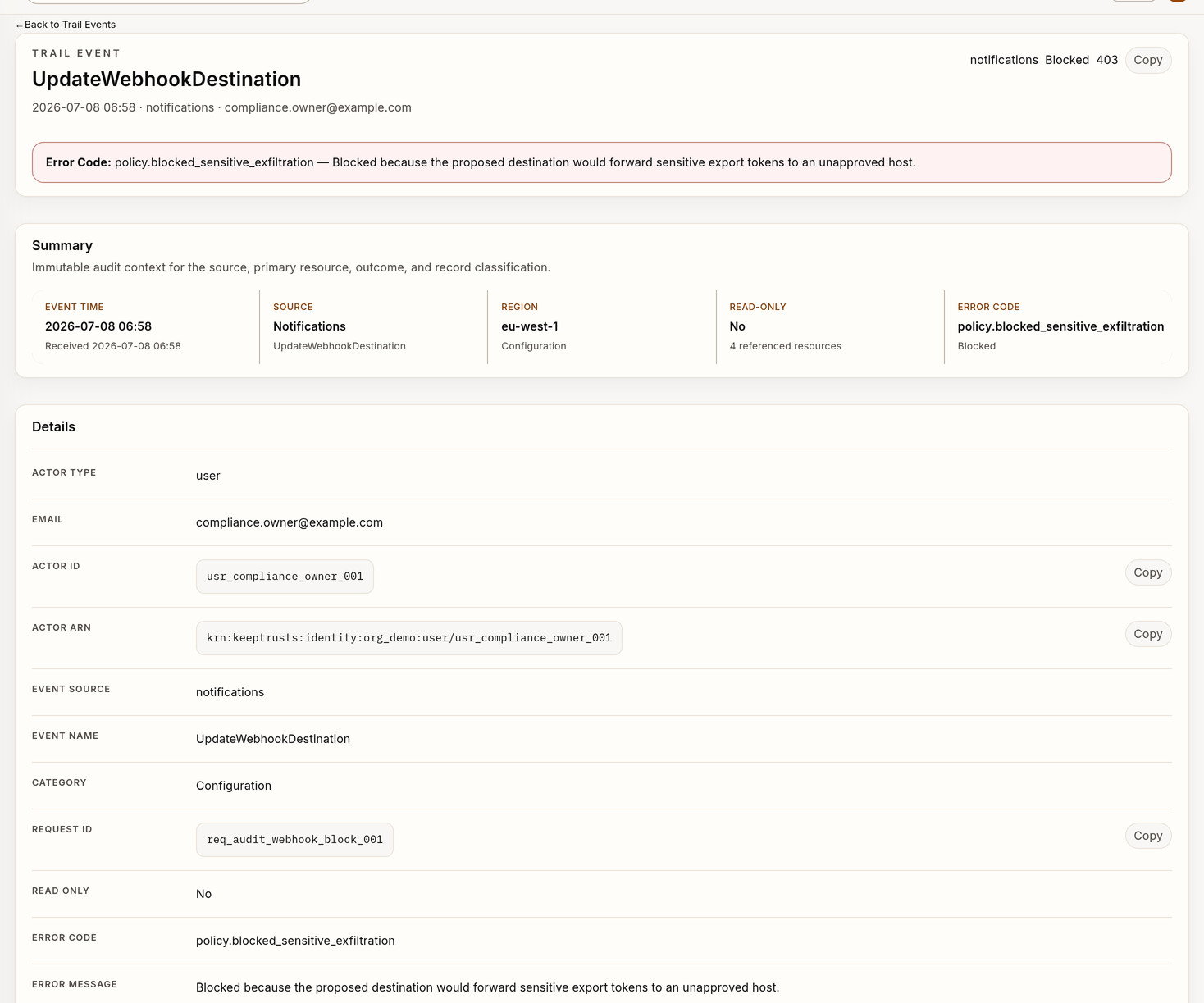
Example Trail record with synthetic audit data.
Read an event
The detail view can expose:
- actor identity and ARN.
- source, name, category, and read-only classification.
- request ID and event ID.
- event time and duration.
- request method and path.
- response status and recorded error details.
- the primary resource type, ID, and ARN.
- record and previous hashes.
- before/after change records.
- more event data.
- full event JSON.
Fields are event-dependent. A missing optional field is not proof that the related activity did not occur.
Reconstruct a change
For an administrative mutation:
- Anchor on the resource ID or request ID.
- Make sure that the actor, organization, region, and UTC time are correct.
- Read the before/after change record.
- Identify referenced roles, policies, agents, gateways, or other resources.
- Examine response status and error fields.
- Follow only the adjacent events that are necessary to show the operation.
- Correlate runtime Events through
verdictan eventsor the Events API. - Add History in a different step when the question includes customer traffic and capture is enabled.
After an HTTP success, verify the resulting resource state. Trail records the operation.
The owning detail page shows the active state.
Export evidence from the console
Open Trail and select the displayed Evidence exports action to queue a
date-bounded evidence export. The direct path is /trail?view=exports.
Raw-data exports are available as CSV or JSON. The same view also gives the
supported compliance-report formats.
This export workflow uses its own start date, end date, and format. It does not inherit filters from the Trail event list.
Before queueing an export:
- Set and record the requested date range.
- Make sure that the organization and region are correct.
- Select a format applicable for the reviewer.
- Record that the export contains decision-event evidence. It does not contain the immutable Trail records displayed in the list at this time.
After the job completes, compare the returned integrity.artifact_sha256 with
the downloaded bytes and examine
GET /v1/exports/jobs/{job_id}/manifest when a manifest is available. Record
the job parameters, integrity values, reviewer, and storage location. To export
immutable Trail records with selected Trail filters, use verdictan trail export.
Verify with the CLI
Use verdictan trail verify for hash-chain, digest, and optional external anchor checks:
verdictan trail verify \
  --org-id 550e8400-e29b-41d4-a716-446655440000 \
  --start-time 2026-07-01T00:00:00Z \
  --end-time 2026-07-08T00:00:00Z \
  --deep \
  --json
Standard verification verifies digest links in a selected nonempty window. Deep verification recalculates event record hashes, inbound links, and sequence continuity.
It also verifies previous-hash links and DSSE signatures when archive segments include the requested interval. Windows fail if the limits are equal, in the incorrect sequence, or empty.
A single-event command verifies only the recorded hash in the fetched event.
External Merkle-root anchors
When your deployment publishes hourly Merkle-root anchors to customer-controlled
immutable storage (s3_object_lock or filesystem_worm), verify a downloaded
signed receipt locally:
verdictan trail verify \
  --org-id 550e8400-e29b-41d4-a716-446655440000 \
  --anchor-receipt ./anchors/550e8400-e29b-41d4-a716-446655440000/2026/08/01/14.json.dsse
The CLI gets the Trail Ed25519 public key and verifies the DSSE envelope. It recalculates the Merkle root from the receipt's leaf hashes.
The CLI reports the backend, storage key, and window. Add a time window to
--anchor-receipt to verify the API chain for that period.
External anchors and CLI verification do not authorize a public “immutable each-decision” claim. This is a tracked capability gap.
The gap is active until post-deployment durability evidence is complete.
Use verdictan trail export for paginated JSON, JSONL, or CSV exports. See
Trail CLI for command details and compression behavior.
Build an evidence packet
Include:
- purpose and review owner.
- organization, region, and UTC window.
- filter or command parameters.
- event, request, actor, and resource IDs.
- configuration or rollout version when related.
- integrity-verification output.
- exported file digest and protected location.
- known gaps or unavailable fields.
- conclusion and next owner.
Keep copied request or response content to a minimum. Do not include credentials, one-time secrets, payment identifiers, or unrelated personal data.
Failed evidence or evidence that is not complete
If verification reports a gap or failure:
- Preserve the complete JSON output.
- Do not relabel the result as verified.
- Make sure that the organization, region, and time boundaries are correct.
- Run the command again only to rule out a transient retrieval error.
- Escalate through the approved audit-integrity workflow.
If a Trail record is missing, examine the runtime Events query, capture-enabled History, and other applicable surfaces.
Also make sure that the selected scope is correct. A missing record in one search does not prove non-occurrence.
Retention and access
Trail exports can contain sensitive metadata about operations. Apply your approved:
- access controls.
- encryption.
- retention schedule.
- legal hold.
- reviewer logging.
- deletion process.
Tagging or exporting an audit record does not change the authoritative retention policy.